Performance
Disclaimer
In a previous version of this page, I compared Miller to some items in the Unix toolkit in terms of run time. But such comparisons are very much not apples-to-apples:
-
Miller's principal strength is that it handles key-value data in various formats while the system tools do not. So if you time
mlr sorton a CSV file against systemsort, it's not relevant to say which is faster by how many percent -- Miller will respect the header line, leaving it in place, while the system sort will move it, sorting it along with all the other header lines. This would be comparing the run times of two programs produce different outputs. Likewise,awkdoesn't respect header lines, although you can code up some CSV-handling usingif (NR==1) { ... } else { ... }. And that's just CSV: I don't know any simple way to getsort,awk, etc. to handle DKVP, JSON, etc. -- which is the main reason I wrote Miller. -
Implementations differ by platform: one
awkmay be fundamentally faster than another, andmawkhas a very efficient bytecode implementation -- which handles positionally indexed data far faster than Miller does. -
The system
sortcommand will, on some systems, handle too-large-for-RAM datasets by spilling to disk; Miller (as of version 5.2.0, mid-2017) does not. Miller sorts are always stable; GNU supports stable and unstable variants. -
Etc.
Summary
Miller can do many kinds of processing on key-value-pair data using elapsed time roughly of the same order of magnitude as items in the Unix toolkit can handle positionally indexed data. Specific results vary widely by platform, implementation details, and multi-core use (or not). Lastly, specific special-purpose non-record-aware processing will run far faster if implemented in grep, sed, etc.
Performance benchmarks: early 2026
For performance testing, the example.csv file was expanded into a million-line CSV file, then converted to DKVP, JSON, etc.
Notes:
- These benchmarks were run in early 2026 on MacBook Air laptop with an M1 processor.
- As of late 2021, Miller was benchmarked using Go compiler versions 1.15.15, 1.16.12, 1.17.5, and 1.18beta1, with no significant performance changes attributable to compiler versions.
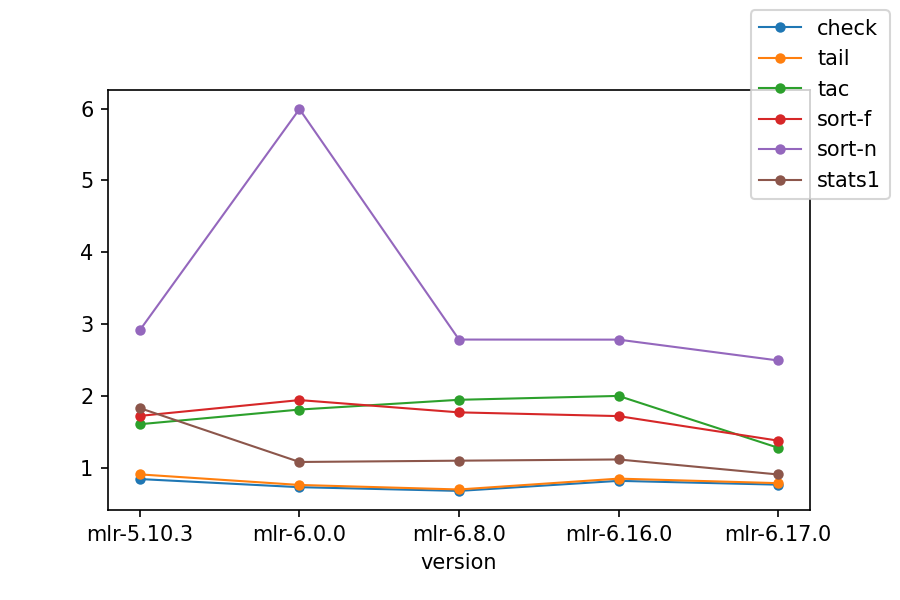
For the first benchmark, the format is CSV and the operations were varied:
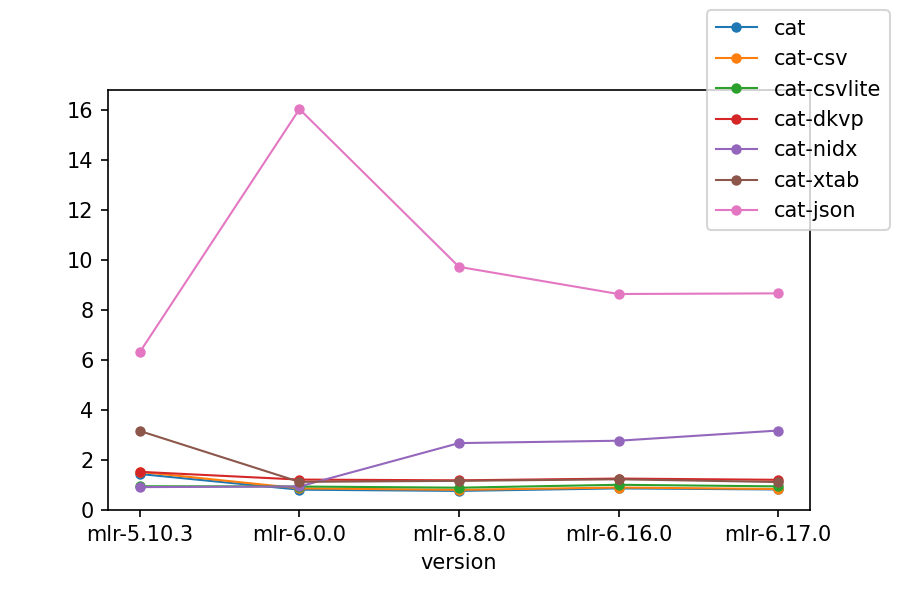
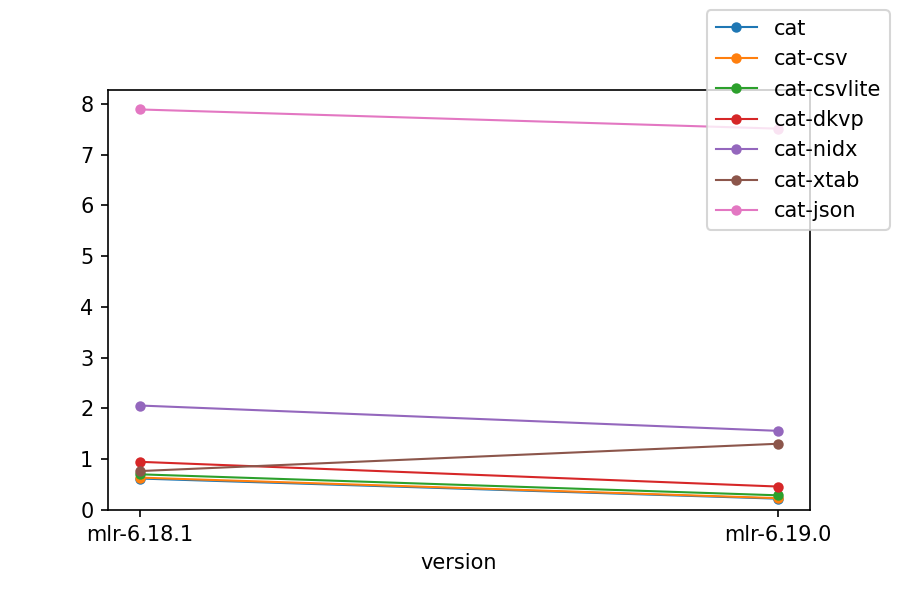
For the second benchmark, we have mlr cat of those files, varying file types, with processing times shown. Catting out files as-is isn't a particularly useful operation in itself, but it gives an idea of how processing time depends on file format:
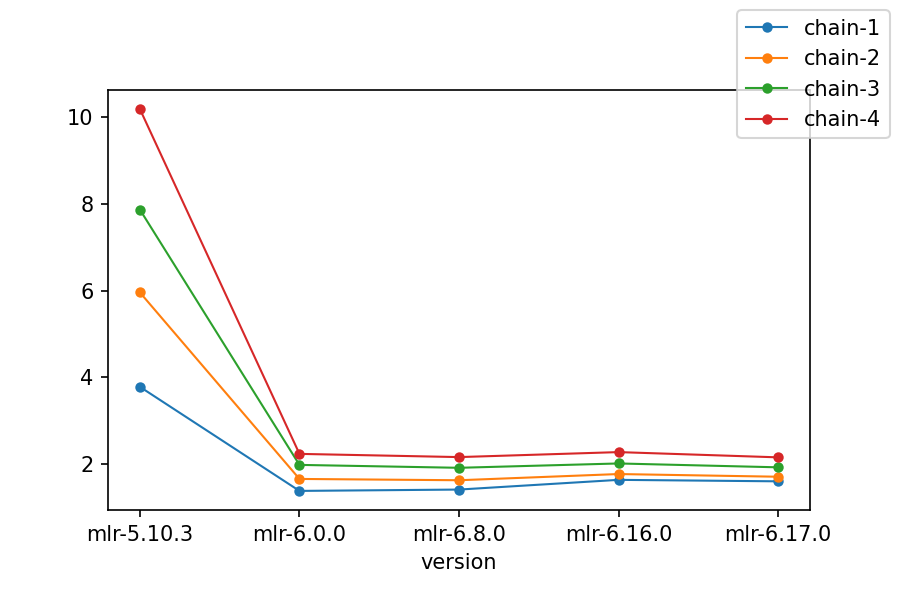
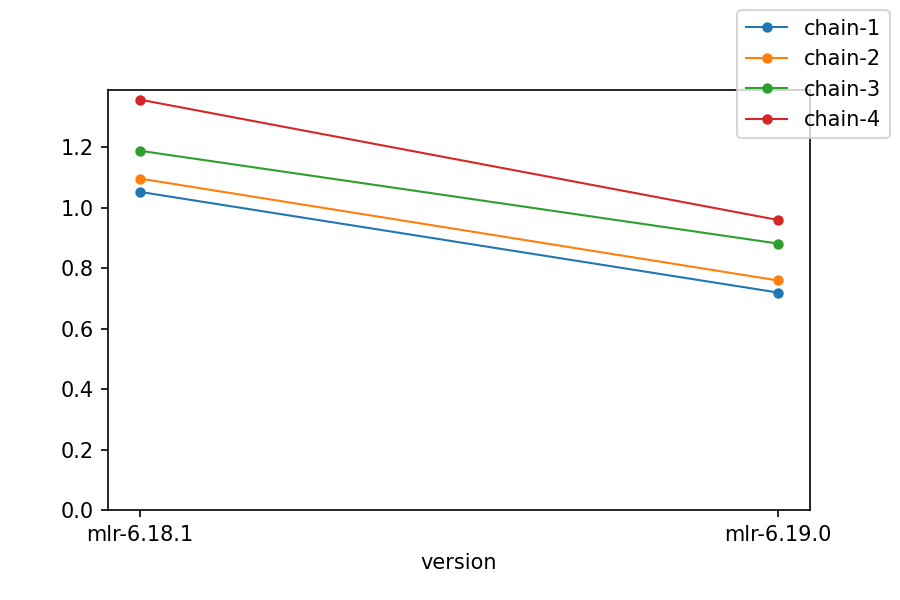
For the third benchmark, we have longer and longer then-chains: mlr put ..., then mlr put ... then put ..., etc. -- deepening the then-chain from one to four:
Notes:
- CSV processing was particularly improved in Miller 6.
- Record I/O was improved across the board, except that JSON continues to be a CPU-intensive format. Miller 6 JSON throughput was the same on Mac and Linux; Miller 5 did better than Miller 6 but only on Linux, not Mac.
- Miller 6.0.0's initial issues with
sortand JSON processing have been resolved. - Even single-verb processing with
putandstats1was significantly faster on both platforms. - Longer then-chains benefit even more from Miller 6's multicore approach.
Allocation/GC optimizations: June 2026
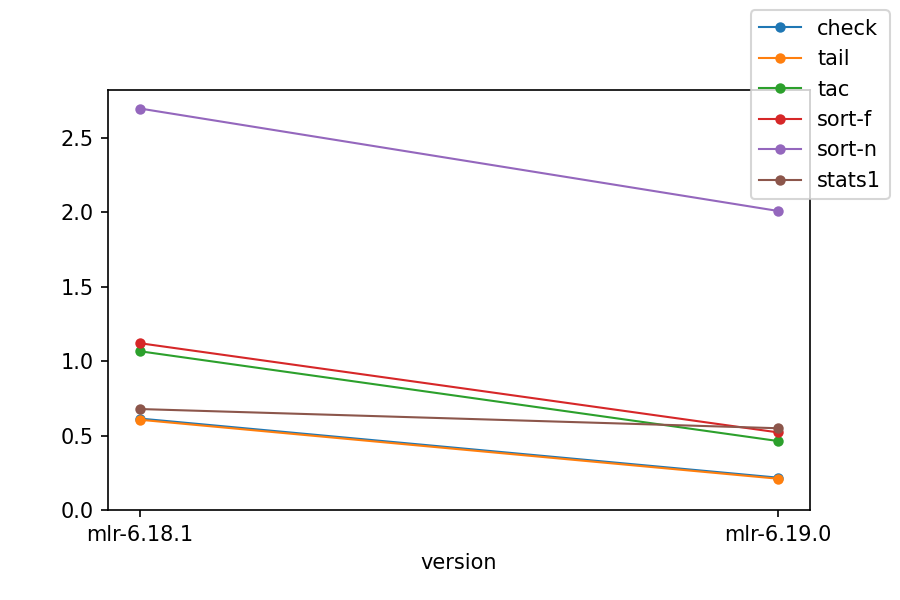
A series of changes in mid-2026 cut per-record and per-field memory allocation throughout Miller's read, write, and DSL paths. On these workloads the dominant controllable cost in the Go implementation is the sheer volume of heap allocations (and the garbage-collection work that follows), rather than GC tuning per se -- so the work focused on reducing allocation count: lazy per-record hashing, batch/slab allocation of record fields and per-record objects, reuse of writer buffers, and stack-frame pooling plus copy-elision in the DSL runtime.
The table below compares wall-clock time before and after these changes, using the same million-record files as above (CSV unless noted), as the best of five runs on an Apple M1 laptop. The put rows use a two-statement script (chain-1), a four-deep then-chain of it (chain-4), a local-variable expression, and user-defined-function-heavy scripts.
| Workload | Before | After | Change |
|---|---|---|---|
cat (CSV) |
0.62s | 0.22s | -65% |
cat (DKVP) |
0.90s | 0.44s | -51% |
cat (NIDX) |
2.02s | 1.56s | -23% |
tac (CSV) |
1.00s | 0.44s | -56% |
sort -nf (CSV) |
3.31s | 2.00s | -40% |
stats1 (CSV) |
0.64s | 0.54s | -16% |
put chain-1 |
1.06s | 0.71s | -33% |
put chain-4 |
1.24s | 0.93s | -25% |
put local-variable |
0.71s | 0.51s | -28% |
put UDF-heavy |
2.81s | 1.71s | -39% |
put map-returning UDF |
2.72s | 1.92s | -29% |
Peak resident set size (RSS) for representative workloads:
| Workload | Before | After | Change |
|---|---|---|---|
cat (CSV) |
379MB | 180MB | -53% |
sort -nf (CSV) |
1389MB | 1306MB | -6% |
put chain-1 |
414MB | 411MB | ~0% |
Notes:
- Streaming I/O verbs such as
catandtacimproved the most;mlr --csv catis now essentially I/O-bound (most of its time is spent in read/write system calls), so its memory use also dropped sharply. sortgot substantially faster in time but barely changed in memory: it intrinsically holds all records in memory at once, so the speedup comes from cheaper record construction, not from fewer live records.- DSL (
put) speedups combine lazy record hashing with DSL-level allocation reductions (stack-frame and frame-set pooling, eliding redundant value copies). Function-heavy scripts benefit most, since each call previously allocated and copied the most. - As always, results vary by platform, file format, and multi-core use.
Decompression options
This is some data from https://community.opencellid.org: approximately 40 million records, 1.2GB compressed, 2.9GB uncompressed:
$ wc -l cell_towers.csv
 40496649 cell_towers.csv

$ gunzip < cell_towers.csv.gz | wc -l
 40496649

$ ls -lh cell_towers.csv*
-rw-r--r--  1 kerl  staff   2.9G Feb 22 12:04 cell_towers.csv
-rw-r--r--  1 kerl  staff   1.2G Feb 22 11:10 cell_towers.csv.gz
First we see that decompression is much cheaper than compression: six seconds vs. three minutes:
$ time gunzip < cell_towers.csv.gz  > /dev/null
real  0m5.546s
user  0m5.352s
sys 0m0.183s

$ time gzip < cell_towers.csv  > /dev/null
real  3m25.274s
user  3m16.391s
sys 0m1.618s
Next we look at system cut which needs to split on lines and fields. Since cut is in the
Unix toolkit it handles integer column names, starting with 1.
This takes a little over a minute on my M1 MacBook Air:
$ time cut -d, -f 1,2,12,13 cell_towers.csv > /dev/null
real  1m8.347s
user  1m7.051s
sys 0m1.167s
Columns 1,2,12,13 are the same as radio,mcc,created,updated. Since
decompression is quick, it's perhaps unsurprising that whether we decompress
and have Miller read uncompressed data, or have it decompress
in-process, or
use an external decompressor with
--prepipe,
the results are about the same.
$ time mlr --csv --from cell_towers.csv cut -f radio,mcc,created,updated
real    1m27.557s
user    3m8.856s
sys     0m6.984s

$ time mlr --csv --from cell_towers.csv.gz --gzin cut -f radio,mcc,created,updated
real    1m35.121s
user    3m58.336s
sys     0m6.591s

$ time mlr --csv --from cell_towers.csv.gz --prepipe gunzip cut -f radio,mcc,created,updated
real    1m27.430s
user    3m18.665s
sys     0m10.017s